Presentation Exercise

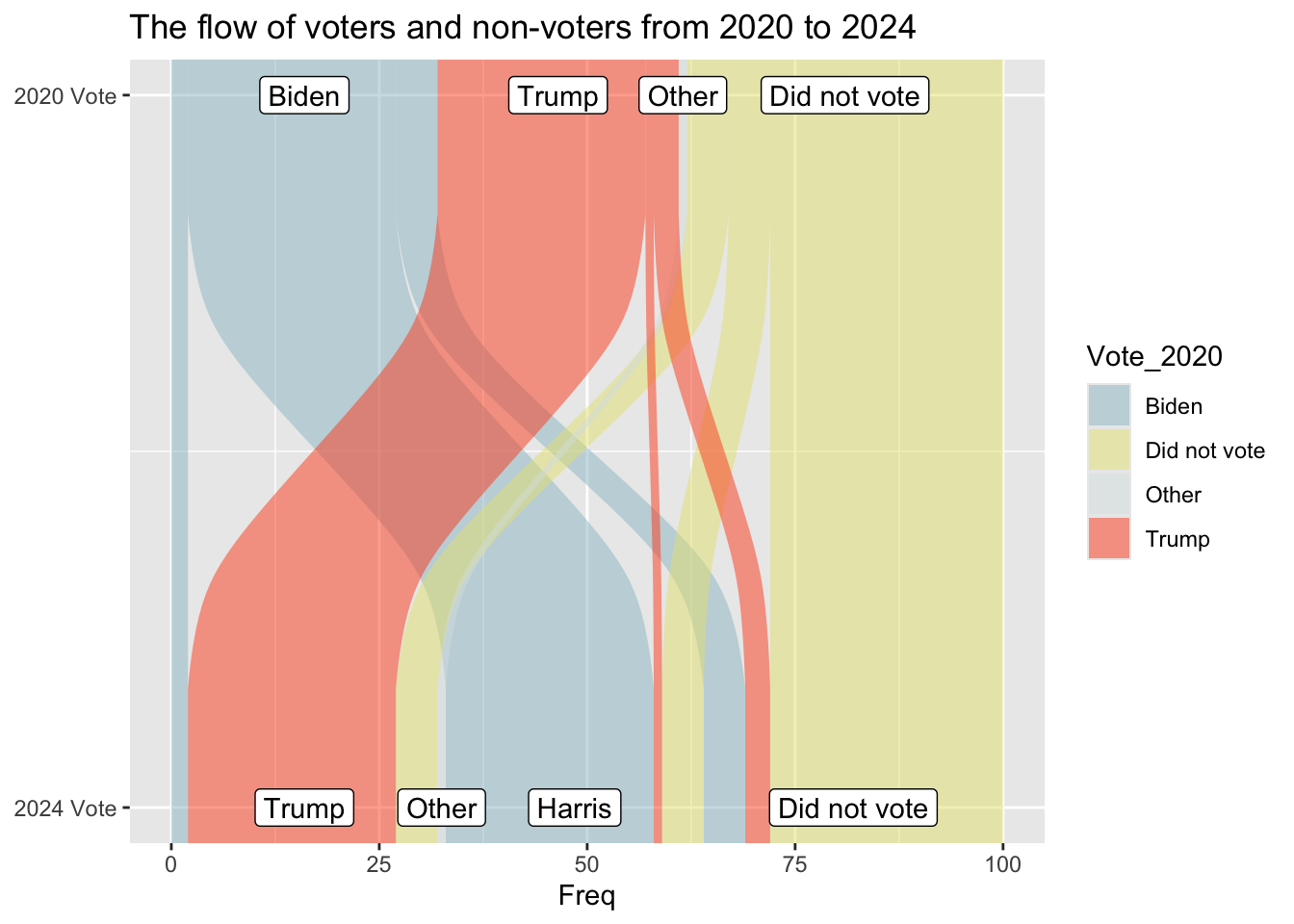
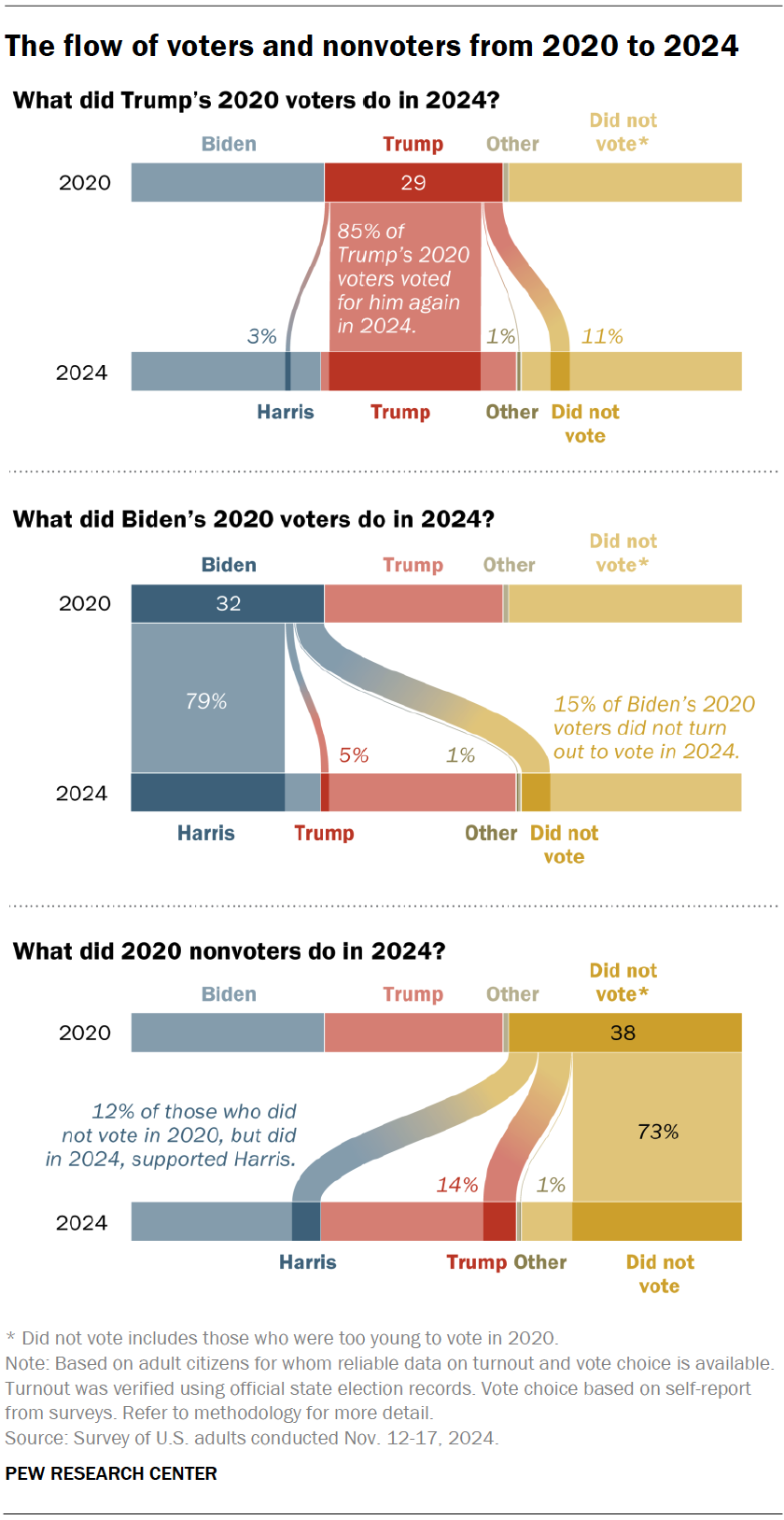
I got my graph from the pew research center https://www.pewresearch.org/short-reads/2025/12/15/our-favorite-data-visualizations-of-2025/sr_25-12-15_data-visualizations_1/ It looks at voters in 2020 and 2024 and determines how many switched their votes. I picked it because my lab has previously used sankey plots to visualize some of our data and I’ve never made one before. There wasn’t a CSV I could download that I saw for this, however the % are labeled on the graph. So I made a spreadsheet including 100 hypothetical voters and used the labeled % to fill it in.

First I need to load packages

library(here)
here() starts at /Users/rebeccabasta/Desktop/EstherPalmer-portfolio
library(dplyr)

Attaching package: 'dplyr'
The following objects are masked from 'package:stats':

    filter, lag
The following objects are masked from 'package:base':

    intersect, setdiff, setequal, union
library(skimr)
library(tidyr) #I think ggalluvial needs this
library(ggplot2)
library(ggalluvial) #for sankey plots, ggplot2 extension
library(knitr)
library(kableExtra)

Attaching package: 'kableExtra'
The following object is masked from 'package:dplyr':

    group_rows

Next I need to load my data

data_location <- here::here("presentation-exercise", "2024_vote_data.csv")
vd <- read.csv(data_location)

Now for a quick look at my data

summary(vd)
  Vote_2020          Vote_2024              Freq      
 Length:10          Length:10          Min.   : 1.00  
 Class :character   Class :character   1st Qu.: 2.25  
 Mode  :character   Mode  :character   Median : 5.00  
                                       Mean   :10.00  
                                       3rd Qu.:20.00  
                                       Max.   :28.00  
glimpse(vd)
Rows: 10
Columns: 3
$ Vote_2020 <chr> "Biden", "Biden", "Biden", "Trump", "Trump", "Trump", "Did n…
$ Vote_2024 <chr> "Harris", "Trump", "Did not vote", "Harris", "Trump", "Did n…
$ Freq      <int> 25, 2, 5, 1, 25, 3, 5, 5, 28, 1
skim(vd)
Data summary
Name vd
Number of rows 10
Number of columns 3
_______________________
Column type frequency:
character 2
numeric 1
________________________
Group variables None

Variable type: character

skim_variable n_missing complete_rate min max empty n_unique whitespace
Vote_2020 0 1 5 12 0 4 0
Vote_2024 0 1 5 12 0 4 0

Variable type: numeric

skim_variable n_missing complete_rate mean sd p0 p25 p50 p75 p100 hist
Freq 0 1 10 11.18 1 2.25 5 20 28 ▇▁▁▁▃

My data looks correct

Now lets see if I can make this plot!

is_alluvia_form(vd)
Missing alluvia for some stratum combinations.
[1] TRUE
#This is a check

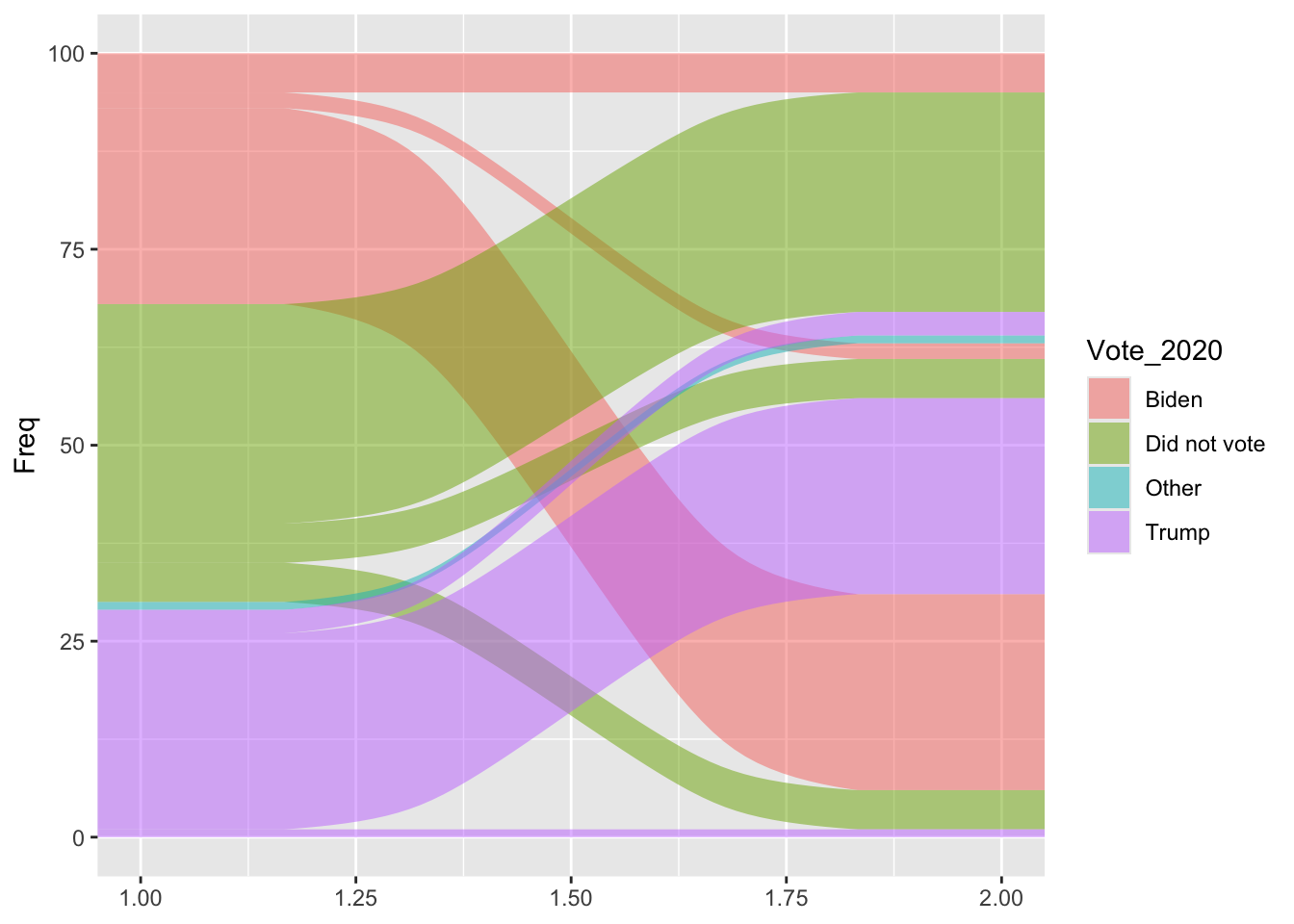
ggplot(vd, aes(y = Freq, axis1 = Vote_2020, axis2 = Vote_2024)) + geom_alluvium(aes(fill = Vote_2020))
Warning in to_lodes_form(data = data, axes = axis_ind, discern =
params$discern): Some strata appear at multiple axes.

This is a good first plot! I want to see if I can add the blocks in and maybe the correct colors

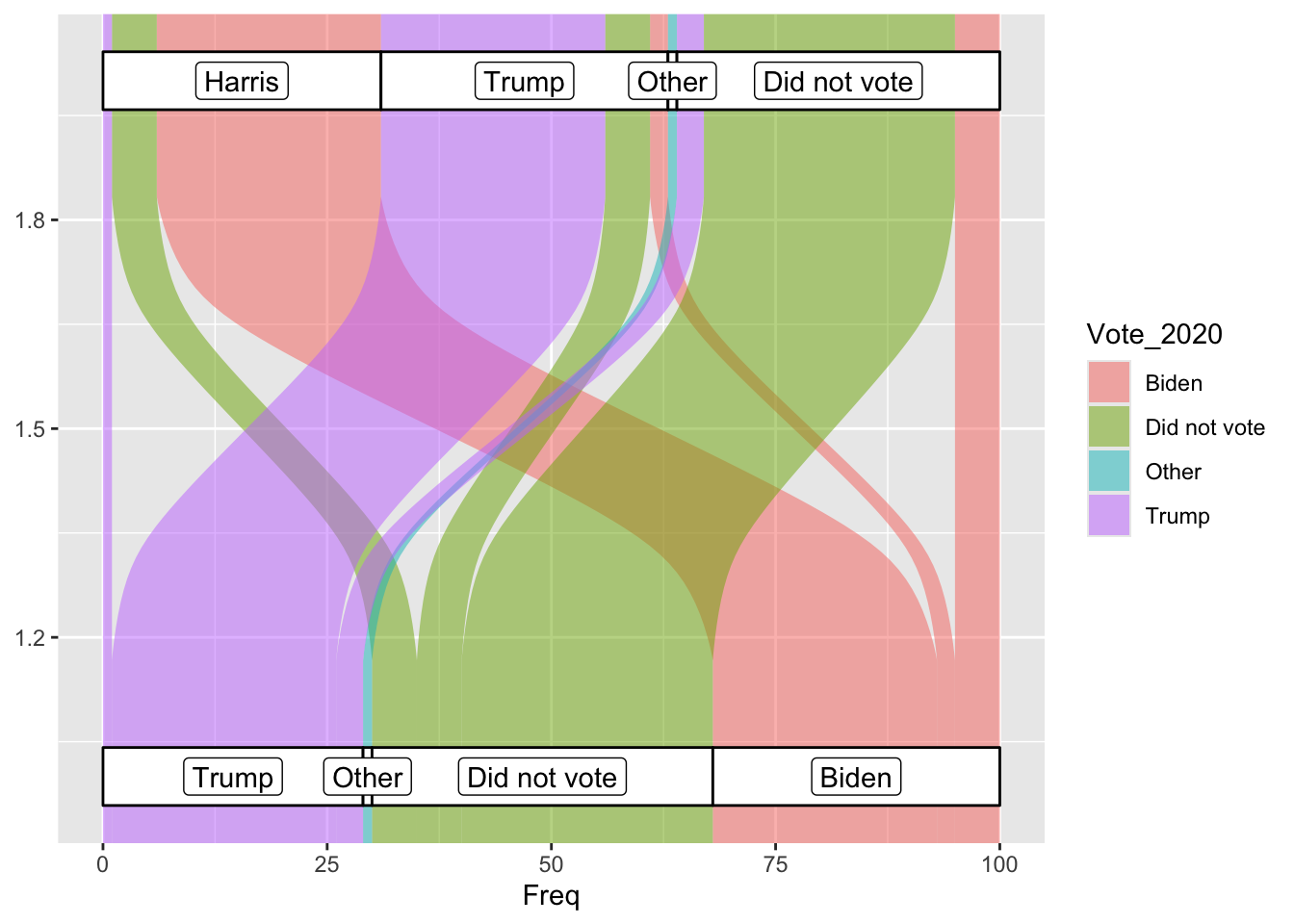
ggplot(vd, aes(y = Freq, axis1 = Vote_2020, axis2 = Vote_2024)) + geom_alluvium(aes(fill = Vote_2020)) + geom_stratum(width = 1/12) + geom_label(stat = "stratum", aes(label = after_stat(stratum))) + coord_flip()
Warning in to_lodes_form(data = data, axes = axis_ind, discern =
params$discern): Some strata appear at multiple axes.
Warning in to_lodes_form(data = data, axes = axis_ind, discern =
params$discern): Some strata appear at multiple axes.
Warning in to_lodes_form(data = data, axes = axis_ind, discern =
params$discern): Some strata appear at multiple axes.

I have managed to flip it on it’s side! Although it’s the wrong side. I have failed so far at colors.

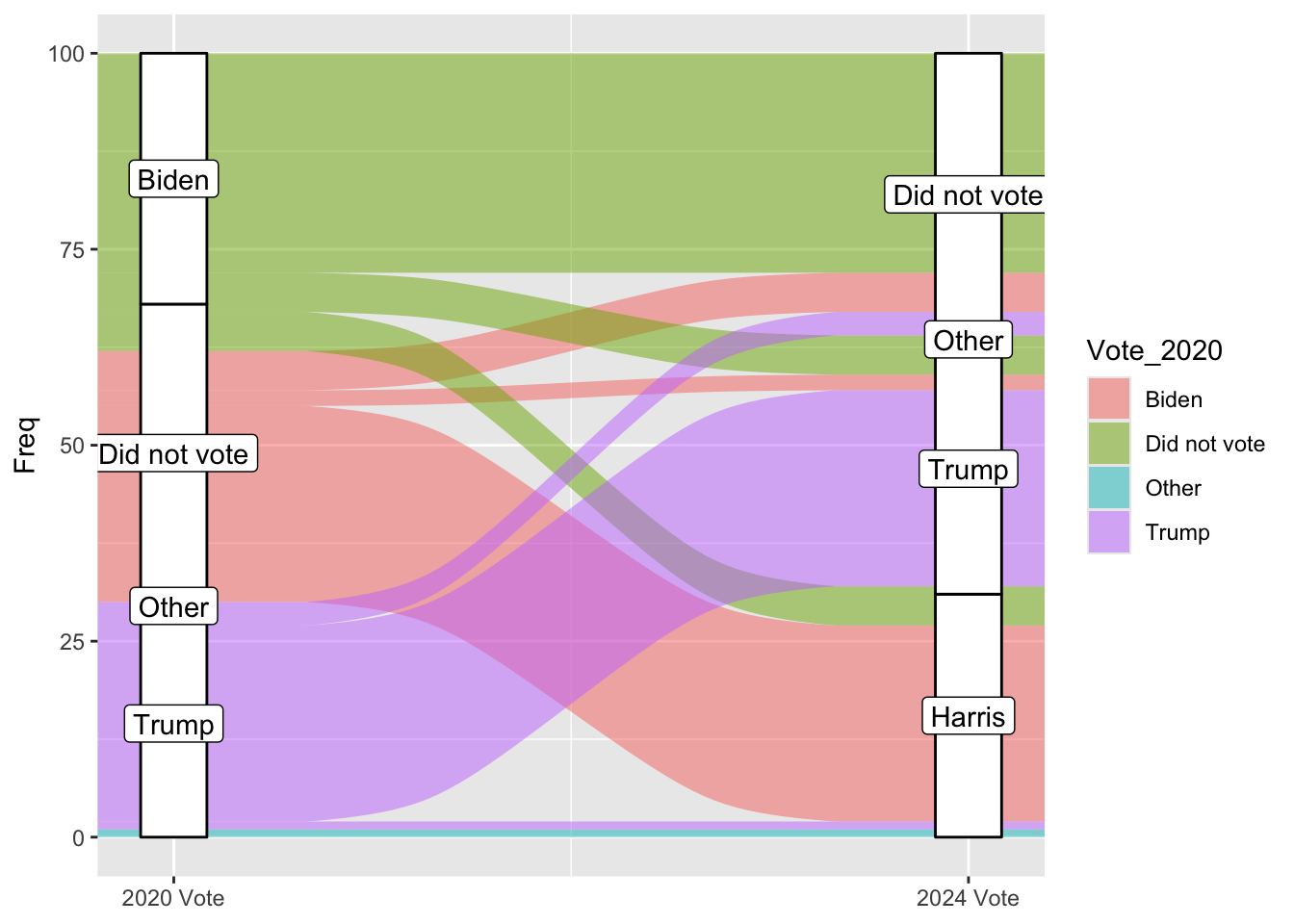
ggplot(vd, aes(y = Freq, axis1 = Vote_2020, axis2 = Vote_2024)) + 
    geom_alluvium(aes(fill = Vote_2020), decreasing = FALSE) + 
    geom_stratum(width = 1/12) + 
    geom_label(stat = "stratum", aes(label = after_stat(stratum))) +
    scale_x_continuous(breaks = 1:2, labels = c("2020 Vote", "2024 Vote")) 
Warning in to_lodes_form(data = data, axes = axis_ind, discern =
params$discern): Some strata appear at multiple axes.
Warning in to_lodes_form(data = data, axes = axis_ind, discern =
params$discern): Some strata appear at multiple axes.
Warning in to_lodes_form(data = data, axes = axis_ind, discern =
params$discern): Some strata appear at multiple axes.

These axis labels do not match the data

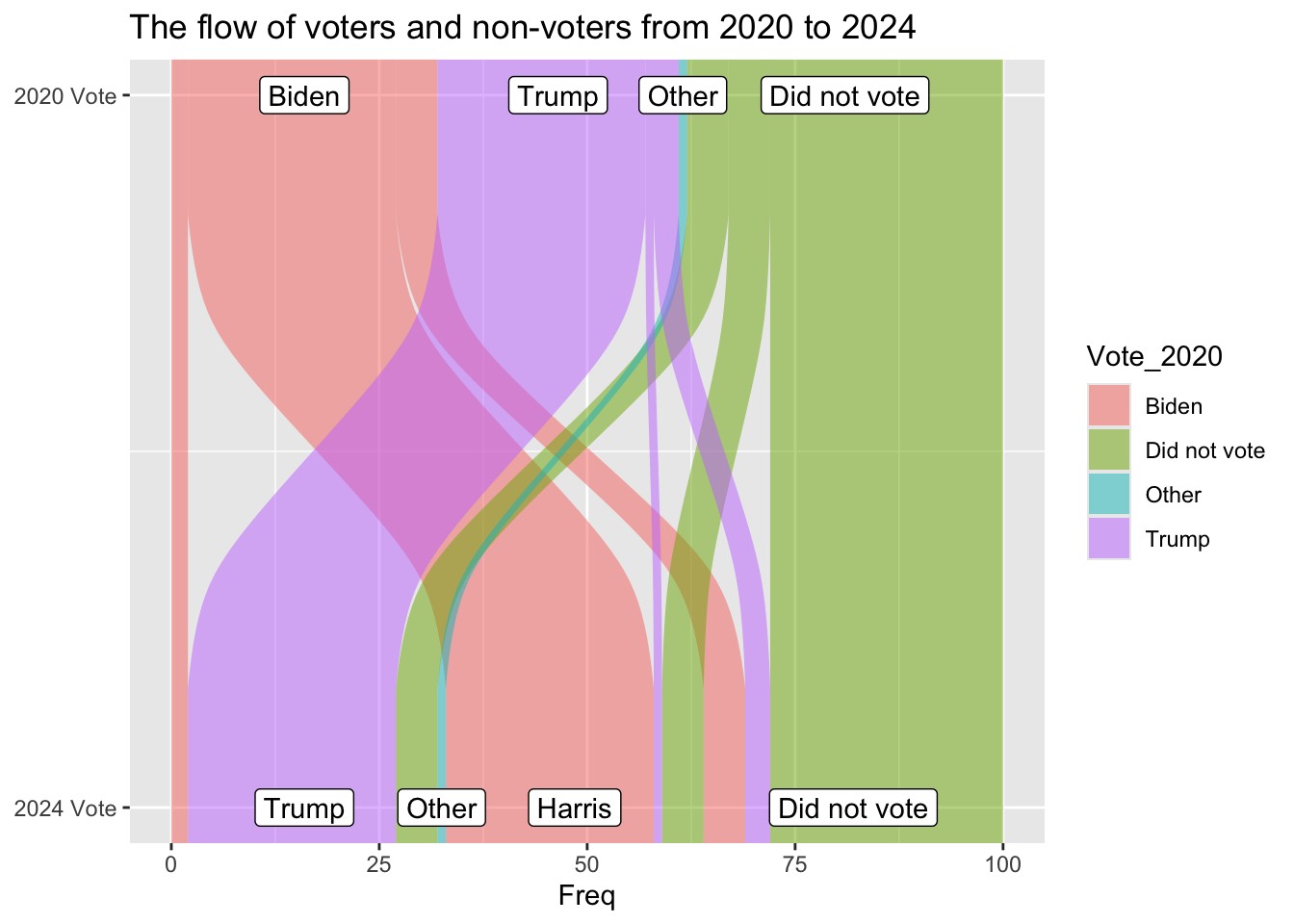
ggplot(vd, aes(y = Freq, axis1 = Vote_2024, axis2 = Vote_2020)) + 
    geom_alluvium(aes(fill = Vote_2020)) + 
    geom_label(stat = "stratum", aes(label = after_stat(stratum))) +
    scale_x_continuous(breaks = 1:2, labels = c("2024 Vote", "2020 Vote")) +
    coord_flip() +
    ggtitle("The flow of voters and non-voters from 2020 to 2024")
Warning in to_lodes_form(data = data, axes = axis_ind, discern =
params$discern): Some strata appear at multiple axes.
Warning in to_lodes_form(data = data, axes = axis_ind, discern =
params$discern): Some strata appear at multiple axes.

So by removing the geom_stratum line I can keep the data labels correct, which is fine, just maybe further away from the original graph. I have solved the flipped y axis being weird by flipping the positions of all my variables.

ggplot(vd, aes(y = Freq, axis1 = Vote_2024, axis2 = Vote_2020)) + 
    geom_alluvium(aes(fill = Vote_2020)) + 
    geom_label(stat = "stratum", aes(label = after_stat(stratum))) +
    scale_x_continuous(breaks = 1:2, labels = c("2024 Vote", "2020 Vote")) +
    scale_fill_manual(values = c("#9AC0CD", "#e7e380ff", "#d9e2e2ff", "#fe4f1eff")) +
    coord_flip() +
    ggtitle("The flow of voters and non-voters from 2020 to 2024")
Warning in to_lodes_form(data = data, axes = axis_ind, discern =
params$discern): Some strata appear at multiple axes.
Warning in to_lodes_form(data = data, axes = axis_ind, discern =
params$discern): Some strata appear at multiple axes.

I figured out the colors, it just really hated when I put the variables in there for some reason

Here is the original graph: Original Graph

Read in data in a useable form for not a sankey plot

table_data_location <- here("presentation-exercise", "Table_data.csv")
td <- read.csv(table_data_location)

So I can insert charts into my table, but first I need to make them

data_location2 <- here("presentation-exercise", "for_pie_chart.csv")
pi <- read.csv(data_location2)

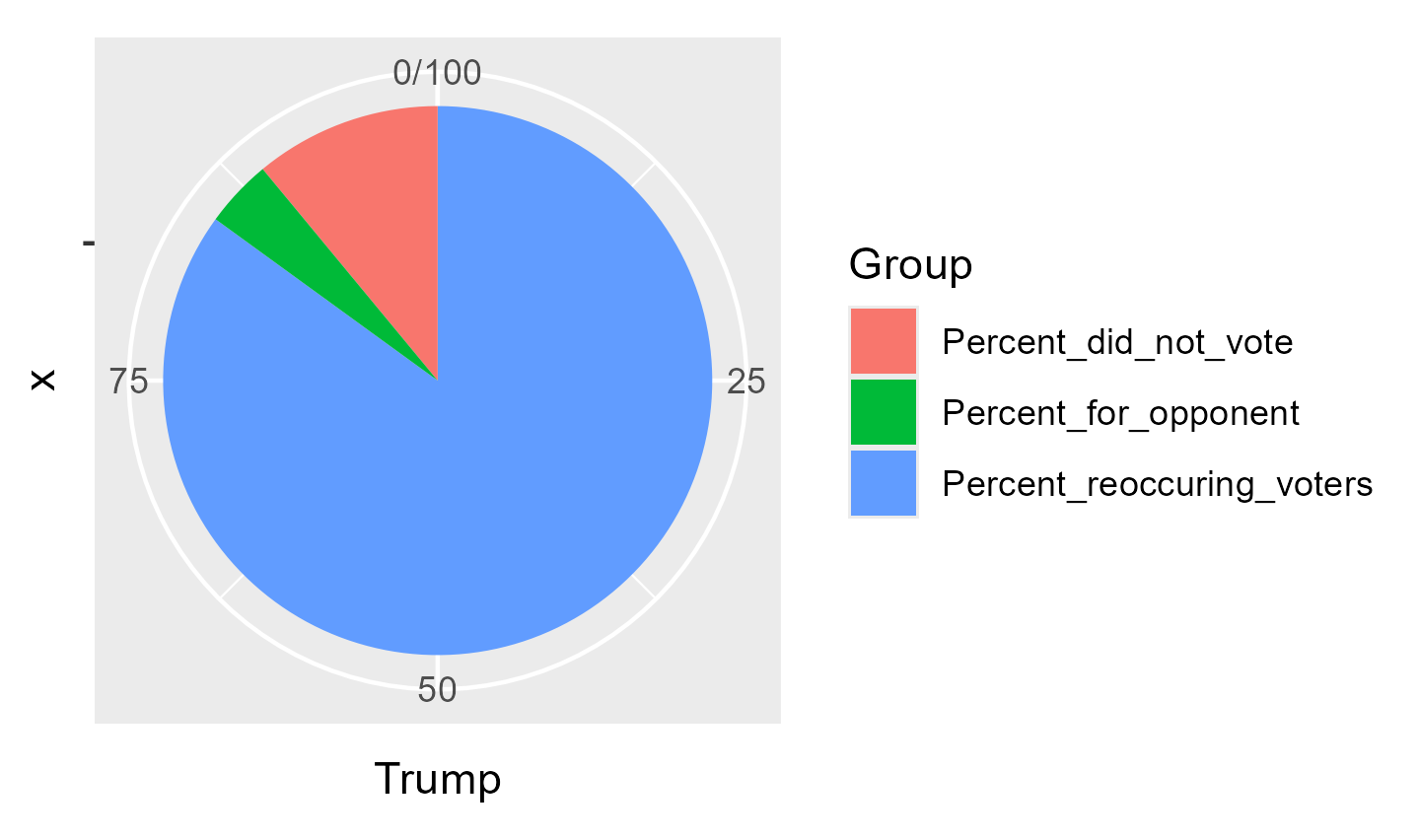
Tpi <- ggplot(pi, aes(x = "", y = Trump, fill = Group)) + geom_bar(stat = "identity", width = 1) + coord_polar("y", start=0)
print("Tpi")
[1] "Tpi"
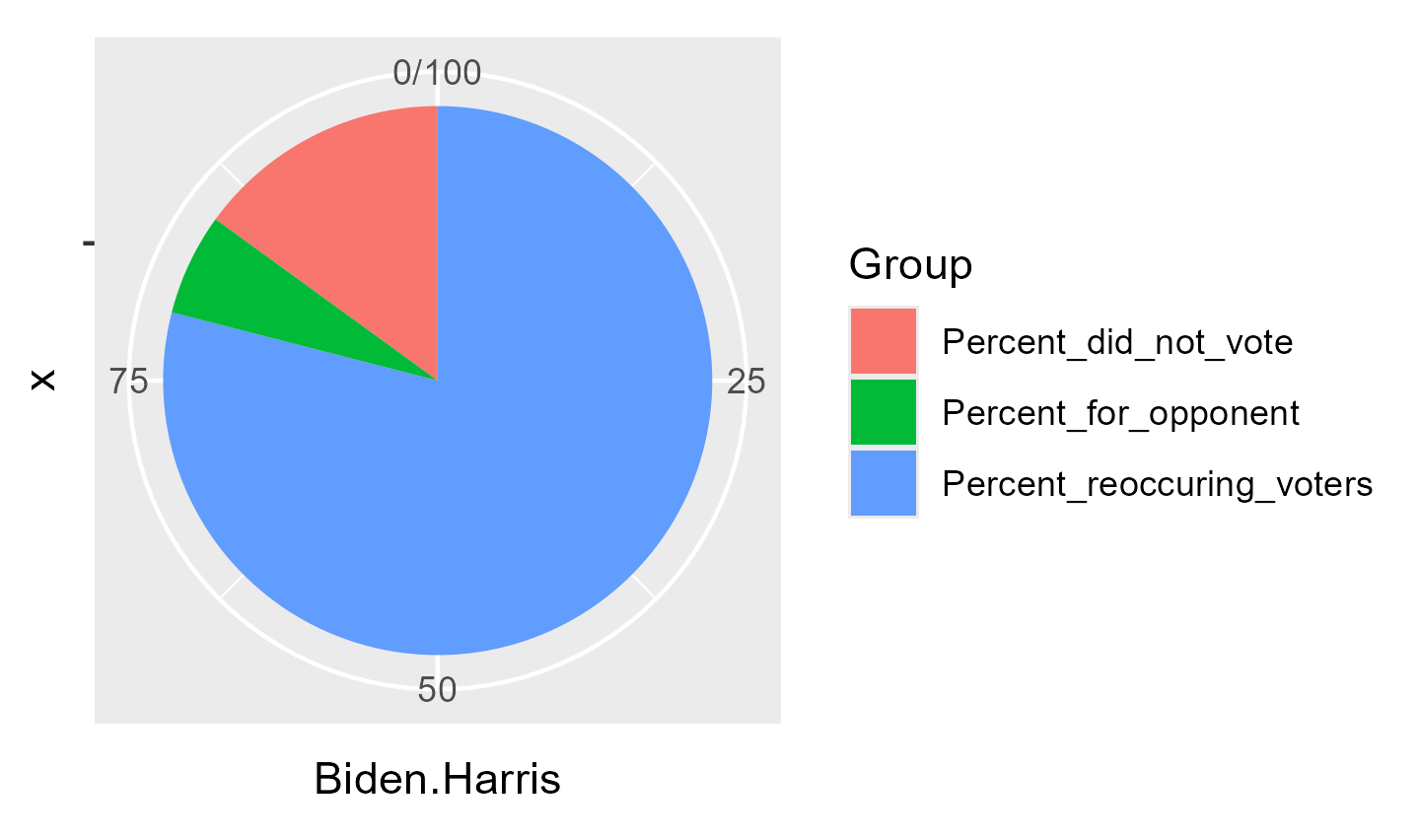
BHpi <- ggplot(pi, aes(x = "", y = Biden.Harris, fill = Group)) + geom_bar(stat = "identity", width = 1) + coord_polar("y", start=0)
print("BHpi")
[1] "BHpi"
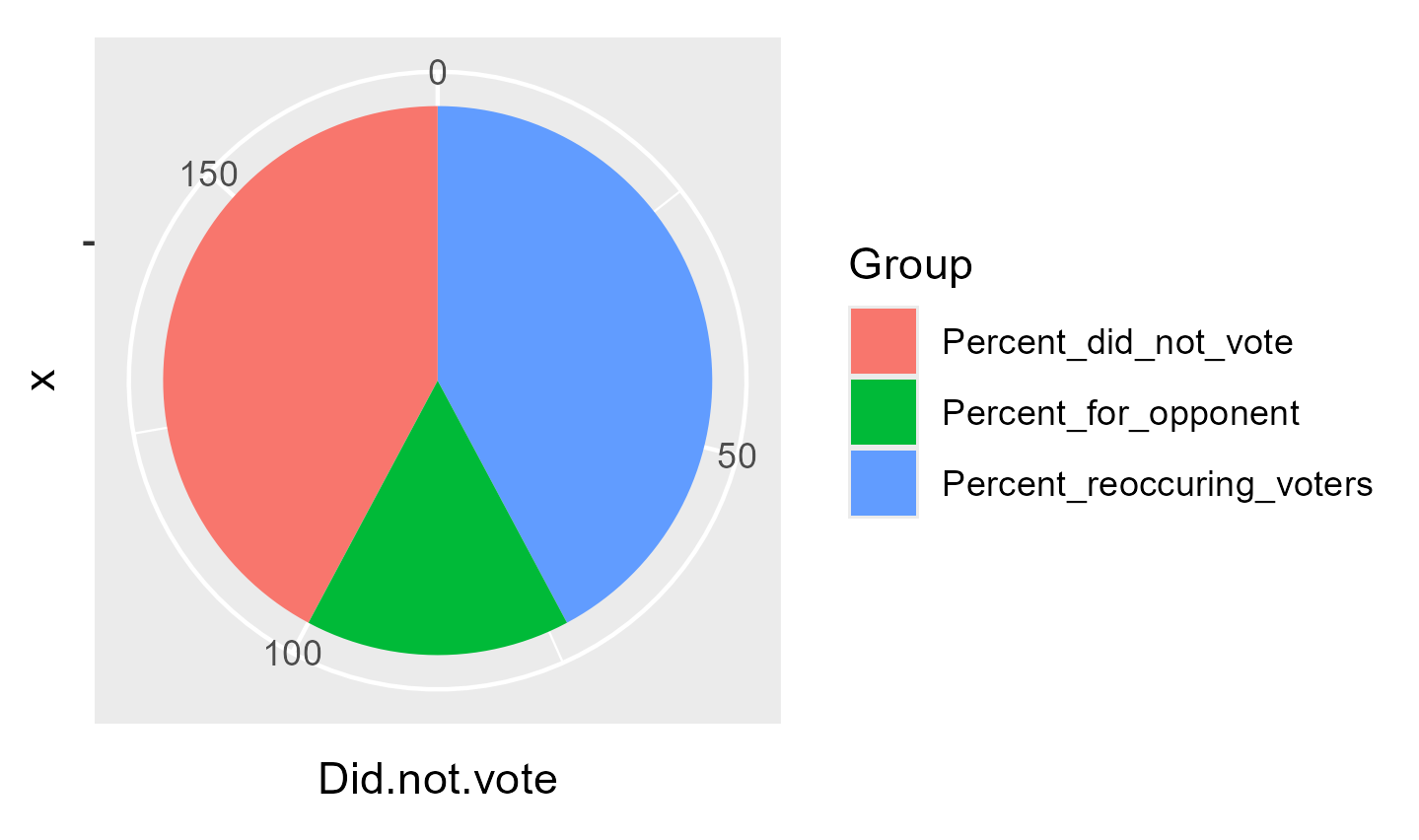
DNVpi <- ggplot(pi, aes(x = "", y = Did.not.vote , fill = Group)) + geom_bar(stat = "identity", width = 1) + coord_polar("y", start=0)
print("DNVpi")
[1] "DNVpi"
charts <- c("Trump_pie.png", "BHpie.png", "DNVPI.png")

Now to put it in table form

rename_columns <- c("Candidate", "2020 Vote", "2024 Vote", "% reoccuring voters", "% did not vote", "% voted for opponent", "Chart")
kable(td, 
    col.names = rename_columns, 
    caption = "Percent of voters for each candidate in 2020/2024 and how many voted for the same candidate in 2024",
    ) %>% 
    column_spec(1, bold = TRUE) %>% 
    kable_styling(latex_options = "striped") %>% 
    kable_styling(fixed_thead = TRUE) %>%
    column_spec(7, image = charts)
Percent of voters for each candidate in 2020/2024 and how many voted for the same candidate in 2024
Candidate 2020 Vote 2024 Vote % reoccuring voters % did not vote % voted for opponent Chart
Trump 29 32 85 11 4 NA
Biden/Harris 32 31 79 15 6 NA
Did not vote 38 36 73 73 27 NA

This is a short table but I made it so that the header scrolls with you because I always get annoyed when I have to scroll to the top with things.